
Tactics & Formations
The Tactics tab is where you commit who plays and how they’re arranged. Your saved lineup + formation drive every match you kick off.
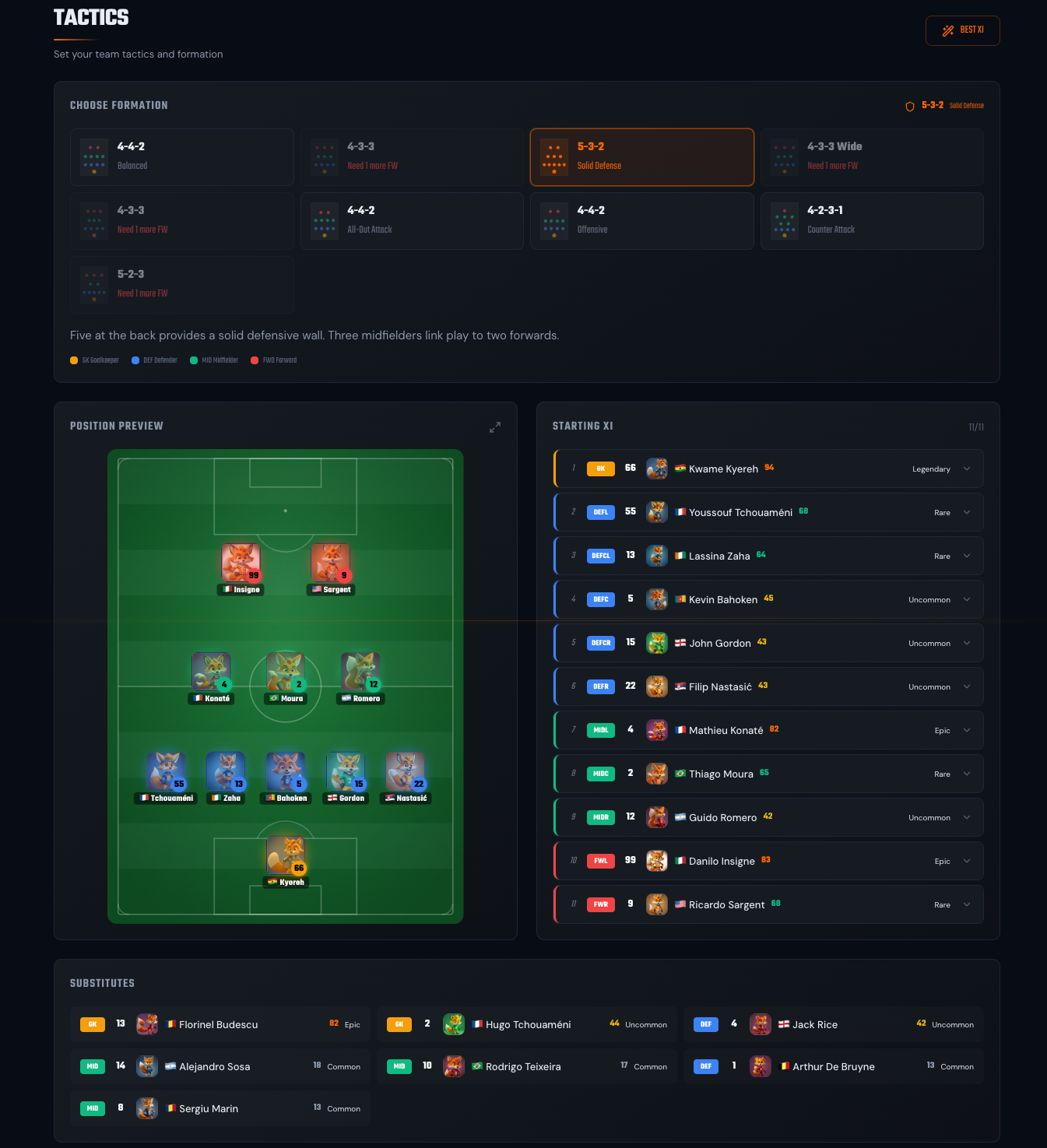
Formations
Section titled “Formations”FoxLeague offers nine formations. Some share the same base shape (three variations of 4-4-2, two of 4-3-3) but adjust player positioning and attacking style differently. Pick the one that matches your squad’s strengths.
4-4-2 family
Section titled “4-4-2 family”- 4-4-2 - Balanced. Classic. Four defenders, four midfielders, two strikers (even coverage across all areas).
- 4-4-2 - All-Out Attack. Standard 4-4-2 that transforms into an aggressive 3-3-4 when attacking. High risk, high reward.
- 4-4-2 - Offensive. Midfield pushes up into a 4-2-4 attacking shape with four forwards.
4-3-3 family
Section titled “4-3-3 family”- 4-3-3 - Attacking. Three forwards, strong attacking power with wide play (midfield can be exposed).
- 4-3-3 - Balanced Attack. Balanced 4-3-3 that maintains shape in both phases (same attacking and defending).
- 4-3-3 Wide - Wide Play. Wide 4-3-3 in attack, drops into 3-4-3 in defense. Wing forwards stretch the opposition with maximum width.
Other shapes
Section titled “Other shapes”- 4-2-3-1 - Counter Attack. Modern setup. Double pivot shields the defense and collapses to 3-1-3-3 when defending.
- 5-3-2 - Solid Defense. Five at the back, three midfielders link play to two forwards.
- 5-2-3 - Wing Attack. Five defenders transition into 3-2-3-2 when attacking. Wing-backs push forward to support three forwards.
Pick by clicking the formation card at the top of Tactics. The pitch view animates to the new shape and your lineup slots reset.
Setting your XI
Section titled “Setting your XI”The pitch view shows position slots. Drag a player from your roster (left side) into a slot. Constraints:
- Position must match (a Defender can’t fill a Forward slot)
- Player must be eligible (no cooldown, not in tournament)
- One slot per player (you can’t field the same player twice)
Each slot shows the position requirement (GK / DEF / MID / FWD) and the assigned player’s OVR. Empty slots are red.
Save your lineup
Section titled “Save your lineup”Click Save Lineup at the bottom. The lineup is now committed. The Squad Readiness widget on PlayMatch updates to show N / 18 ready (11 starters + 7 substitutes).
If you don’t save, the previous lineup stays in effect.
Rotating reserves in
Section titled “Rotating reserves in”If you own more than 18 players (e.g. you’ve bought extras on the marketplace or fused new ones), the surplus shows up in a Reserves strip below the bench. You can rotate them into the lineup or onto the bench directly from Tactics. No need to bounce out to the Squad page.
The flow is tap-to-select, tap-to-place:
- Tap a Reserve card. It highlights with an orange outline (“Selecting…”). All slots that this player can legally occupy (matching position, in either the XI or the bench) light up with a yellow pulse.
- Tap a highlighted slot. The Reserve swaps in. Whichever player was occupying that slot is displaced. They drop back into the Reserves pool.
- Save Lineup to commit the new arrangement.
You can cancel a selection by tapping the same Reserve again or by clicking anywhere outside a highlighted slot.
Position still matches strictly. A Forward Reserve can only swap into Forward slots. Listing or fusing a Reserve still happens on the Marketplace → Fusion / Marketplace → Sell flows.
What actually drives the match
Section titled “What actually drives the match”When you kick off:
- Your saved lineup decides who’s on the pitch.
- Each player’s synced stats drive their on-pitch performance: passing range, shot power, recovery, decision-making. Any training that isn’t synced yet won’t show on the pitch.
- Your formation decides starting positions and roles.
- The match plays out live (around 10 minutes). Watch the action unfold, then check your History to relive past matches anytime.
Level and condition affect availability (who’s eligible to play), not their in-match performance directly. Your synced stats, the right players in the right positions and the formation that fits them are what win games.
Squad Readiness widget
Section titled “Squad Readiness widget”The widget on Squad and PlayMatch shows ready / total players. To kick off a match, you need 18 ready (11 starters + 7 substitutes). Below 18, kickoff is disabled.
Reasons a player might NOT be ready:
- In transfer cooldown: currently 10 days (240h) after a wallet-to-wallet receive. You can pay to cut it to a 24h floor in Marketplace → Shop → Reduce Cooldown
- Locked in tournament: they’re committed elsewhere
- Not assigned to lineup: they’re in your roster but not in the saved XI
The widget breaks down by position so you see if you’re short of, e.g., midfielders.
- Match stats to position. A high-Defense Defender is worth more than a high-Defense Forward. Stats interact with their role on the pitch.
- Save your lineup before syncing. Sync updates the on-chain stats of your active squad, so save your XI first to make sure the right 11 get the update applied.