
Build Your First Squad
Your Squad is your team. A name, a badge, a formation and a roster of players. Before your first match, you set all four.
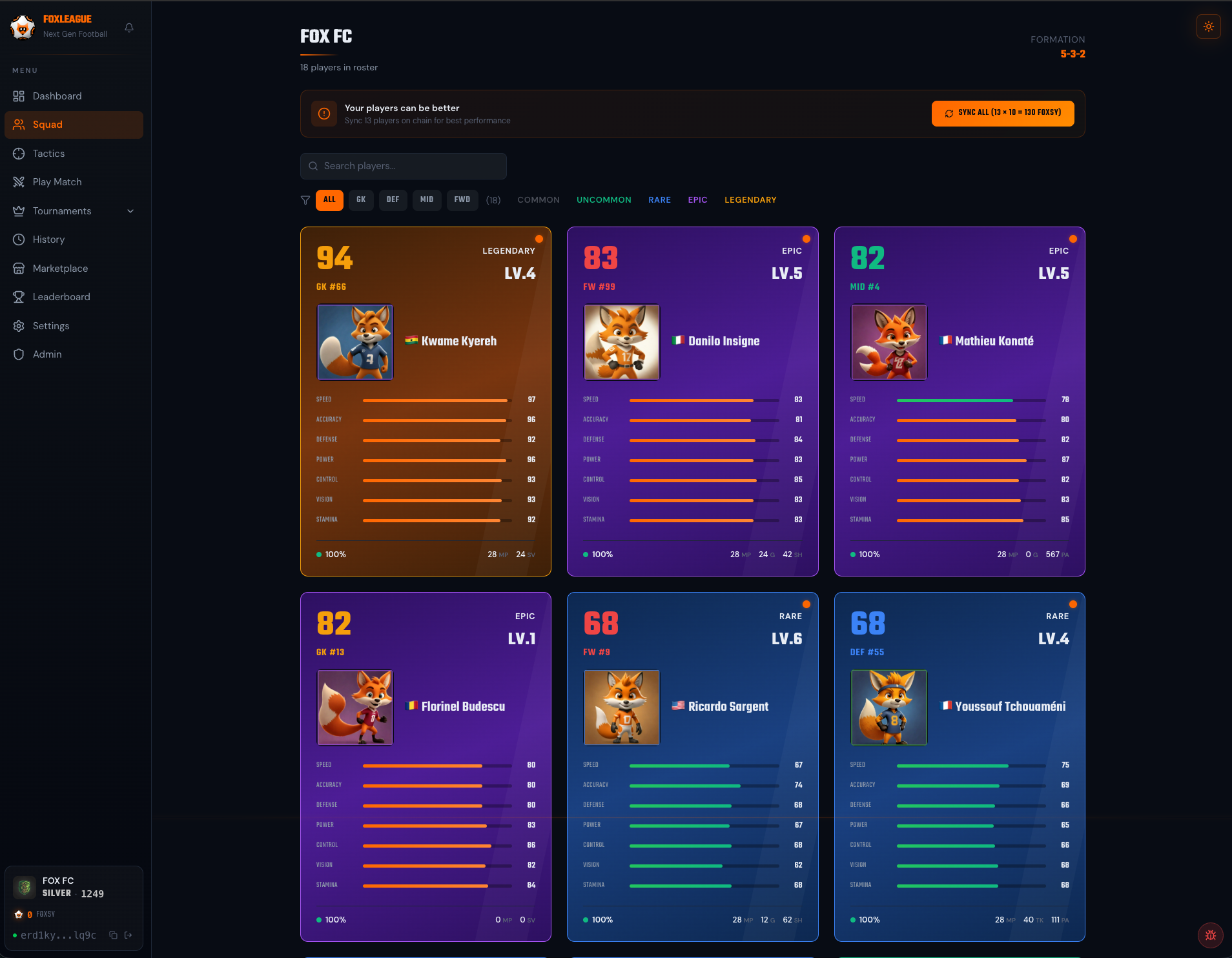
How the Squad page is organized
Section titled “How the Squad page is organized”Your 18-player roster is rendered in three stacked sections with sticky headers, so role distribution is legible at a glance:
| Section | Cap | What it is |
|---|---|---|
| STARTERS | up to 11 | Players in your saved starting XI |
| SUBSTITUTES | up to 7 | Bench players that auto-rotate in if a starter goes ineligible |
| RESERVE | 0..n | Owned players currently outside the lineup (rotate in from Tactics) |
Each player card carries a small corner notch at the top-left that tells you the role at a glance, even before you read the section header:
- Filled circle ● = STARTER
- Half-filled circle ◐ = SUBSTITUTE
- Outlined circle ○ = RESERVE
Filters at the top of the page narrow content within each section. Picking RAR=Legendary shows you legendary starters AND subs AND reserves separately, instead of collapsing them into one list.
Name your team + pick a badge
Section titled “Name your team + pick a badge”- First time you log in, you go through Onboarding process. Pick a team name (3-15 chars) and generate a team badge (AI-generated SVG, you get to re-roll a few times)
- The badge is minted as an NFT on MultiversX and becomes your team’s unique identity. It appears in match intros, on the leaderboard and across other players’ views throughout the platform.
You can rename the team later from the Settings tab. Settings also has an optional Coach Name, a manager name shown on your team card that is separate from the team name. It is completely optional and you can leave it blank. It is the first step toward the upcoming National World Cup, where you would enter the coach race as a person rather than as a club.
Pick a formation
Section titled “Pick a formation”FoxLeague ships nine formations. Some share the same shape (three 4-4-2 styles, two 4-3-3 styles) but differ in how players are spread on the pitch and which attacking style your matches use:
| Formation | GK | DEF | MID | FWD | Style |
|---|---|---|---|---|---|
| 4-4-2 | 1 | 4 | 4 | 2 | Balanced |
| 4-4-2 | 1 | 4 | 4 | 2 | All-Out Attack |
| 4-4-2 | 1 | 4 | 4 | 2 | Offensive |
| 4-3-3 | 1 | 4 | 3 | 3 | Attacking |
| 4-3-3 | 1 | 4 | 3 | 3 | Balanced Attack |
| 4-3-3 Wide | 1 | 4 | 3 | 3 | Wide Play |
| 4-2-3-1 | 1 | 4 | 5 | 1 | Counter Attack |
| 5-3-2 | 1 | 5 | 3 | 2 | Solid Defense |
| 5-2-3 | 1 | 5 | 2 | 3 | Wing Attack |
Set your formation in the Tactics tab. The pitch view updates to show the new shape. Full per-formation descriptions on Tactics & Formations.
Set your starting XI
Section titled “Set your starting XI”In Tactics, drag players from your roster into the formation slots. Constraints:
- The position has to match (a Defender can’t fill a Forward slot)
- Player must NOT be in transfer cooldown (currently 10 days after a wallet-to-wallet transfer; reducible to a 24h floor via the Shop. See Marketplace)
- Player must NOT be locked into a tournament (see Tournaments)
Save the lineup. The Tactics tab shows your committed XI for the next match.
Best XI (auto-pick)
Section titled “Best XI (auto-pick)”Don’t want to drag and drop? Click the Best XI button. The app fills your formation automatically with the highest-fit player available for each slot:
- Evaluates every position in your selected formation
- Picks the best-fit eligible player for that slot (using your players’ latest on-chain stats)
- Assigns the top 7 remaining players as substitutes
- Saves the lineup
If you don’t have enough players for a position (e.g. only 3 DEF but you picked 5-3-2 needing 5), Best XI tells you which positions are short so you can change formation or hit Marketplace.
Squad readiness
Section titled “Squad readiness”The Squad Readiness widget on Squad / PlayMatch tells you how many players are eligible right now (not in cooldown, not locked). You need a full 18 to be match-eligible. 11 starters plus 7 substitutes. Below 18, you can’t kick off a match.
If a player is sitting out:
- Cooldown → wait. The player card shows minutes remaining.
- Locked in tournament → finish the tournament or wait for it to end.
Reserves (owned but not in lineup)
Section titled “Reserves (owned but not in lineup)”The third section, RESERVE, holds any players you own who aren’t currently in the 11 starters or the 7 substitutes. They’re not active in matches as-is, but you can rotate them into the lineup from Tactics. See Tactics & Formations for the tap-to-swap flow.
A typical roster sits at 18 players (the starter pack), so RESERVE will normally show 0 until you buy/fuse extras from the marketplace or fusion flow.